During week 2 the main focus was animation and what goes into animation such as time, the different types and more.
Animation
Animation is the change of an object’s position over time. this can be done using mathematical formulas to affect the behaviour of movement and establish the following positions on the object. Animation isn’t just limited to movement it can change anything visual about an object such as size, rotation, colour and more.
After learning what animation is I moved on the learning the different types of animation and the difference between them.
Frame-based animation
Frame-based animation is when you rely on the frame rate to update your animation. If the frame rate was running at 60 frames per second the animation will run a lot smoother than it would at 10 frames per second. This type of animation works best when the frame rate stays constant which is unrealistic so if frame-based animation is used players should expect to see some frame drops on occasion.
Time-based animation
The other type of animation is time-based animation. This animation calculates what frame you are on and how much time has passed since the last and depending on these values it will update your frame. So no matter your frame rate the animation on your screen will keep up with someone who is on 60 frames per second. But if you have a low frame rate it will make the animation look jumpy and not as appealing.
The reason you may choose frame-based animation over time-based animation and vice-versa depends on the game you want to make. If you are looking into making a single-player story-driven game you may want to go with frame-based animation because even if frames are dropping you will not fall behind anyone else. But if you were to make an online fighter you will want to use time-based animation because even if the player has a frame drop they do not have a disadvantage because they will fall behind someone else’s game.
LERPs
I have also had a quick introduction to LERPs(Linear Interpolation) which is a way to move an object from one point to another in a specific amount of time. The time value is between 0 and 1. The closer it is to 0 the closer it is next to point A and the closer it is to 1 the closer it is to point B. Looking at examples of LERPs in use one example I found particularly interesting was an example where a circle followed the cursor using a LERP function(https://codepen.io/ma77os/pen/OJPVrP)
Below is the way a LERP function would be written in javascript.
function lerp (start, finish, time){
  return (1-time) * start + time * finish
}
Easing
Finally, I had moved on to the easing. easing can be used for many things but one example it can be used for is acceleration/deceleration. I created a visual of easing on a graph.
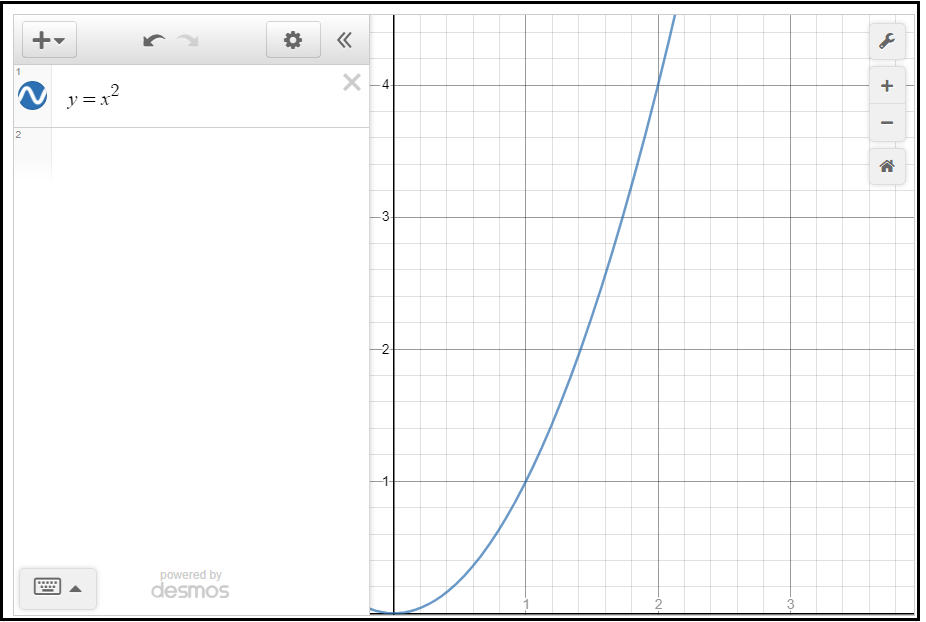
Above is a visual representation of easing. this could be used for acceleration as you can see it starts slow and then gets faster as time goes on. below would be a visual representation of deceleration.
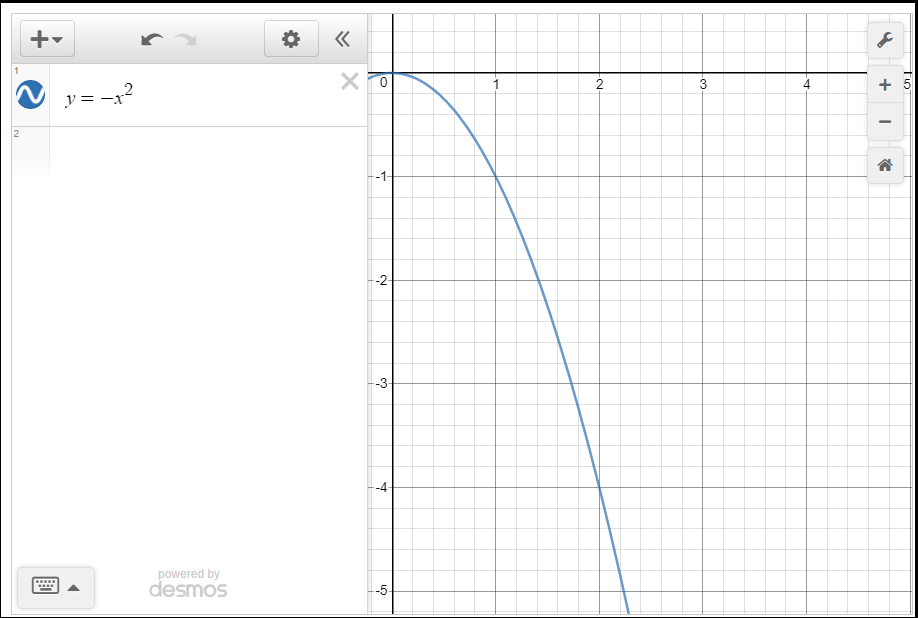
After looking into easing equations I looked online for some simple tutorials on how to get animation working in javascript and created simple animation. The animation, makes the shapes move back and forth on the canvas.
function myMove() {
  let id = null;
  const elem = document.getElementById("circle");
  let pos = 0;
  clearInterval(id);
  id = setInterval(frame, 0.01);  //chnage speed
  function frame() {
    if (pos == 929) {
      clearInterval(id);
      myMove2()
    } else {
      pos++;
      elem.style.left = pos + "px";
      elem.style.right = pos + "px";
    }
  }
}
I haven’t used easing equations for this because I am not super confident in how they work so I will look more into them and see if I can get an easing equation implemented into this code or another piece of code I work on.